
Build log · Week 2
Week 2 build log: 3 steps forward, 1 step back
I'm brand new to AI, and I'm building a small business with a team of AI bots. Week 1 was about getting anything out the door. Week 2 was about learning what it costs to run the team, and how to keep it pointed in the right direction.
The step back: paying for every tiny fix
Midweek we ran out of AI usage with 3 days left in the week. Looking back, a lot of it went to loops. One custom test page went through more than 17 versions, and most of those rounds were small fixes that each cost a full pass. Heavy work like new art, video edits and big batches now waits until right after the reset, and the slow days went to planning and fixing how the bots work.
What the checker caught / missed this week
Caught: about 1 in 4 QC checks sent work back for another round, before it got to me.
Missed: Saturday, our off-road book came to me for final approval, and it was full of dog pictures and dog pages. The sample pages on the back cover were all dogs, not a single off-road picture. It was basically a dog book with an off-road title and cover.
It passed every one of our QC checks. The pages were fine; the subject just didn't match the title. The bots can get so focused on little detailed problems that they miss the big picture.
We were ahead of schedule. Then we read the back cover.
It cost us a few days, but we caught it before launch. A mistake caught at the very last approval is the expensive kind: everything already done has to be redone. The lesson is to ask "does this actually match the title?" at the first draft, not at final approval. It's a two-minute look before the costly page work. The good news: the same kind of mistake keeps happening less and less, so the bots are learning.
Step forward 1: we shipped
- Two more books went live on Amazon: Yorkie Life and UTV Adventures Vol 2, Trails Across America.
- Our first two Christmas packs are live on Etsy, and the rest of the Christmas line is waiting on samples. Christmas Pups is ready to submit, and Off-Road Advent is being fixed.
- Our first merch test orders came in, and they look good.
Here's what we made, if you're curious: UTV Adventures Vol 2 · UTV Adventures Vol 1 · Project878 on Etsy
Hurry up and wait
We order our own products so we can hold them and check them. A few of our coloring books and some merch test orders have come in for inspection. We're still waiting on ornaments and custom T-shirts, and we won't push them until we've seen a sample in person.
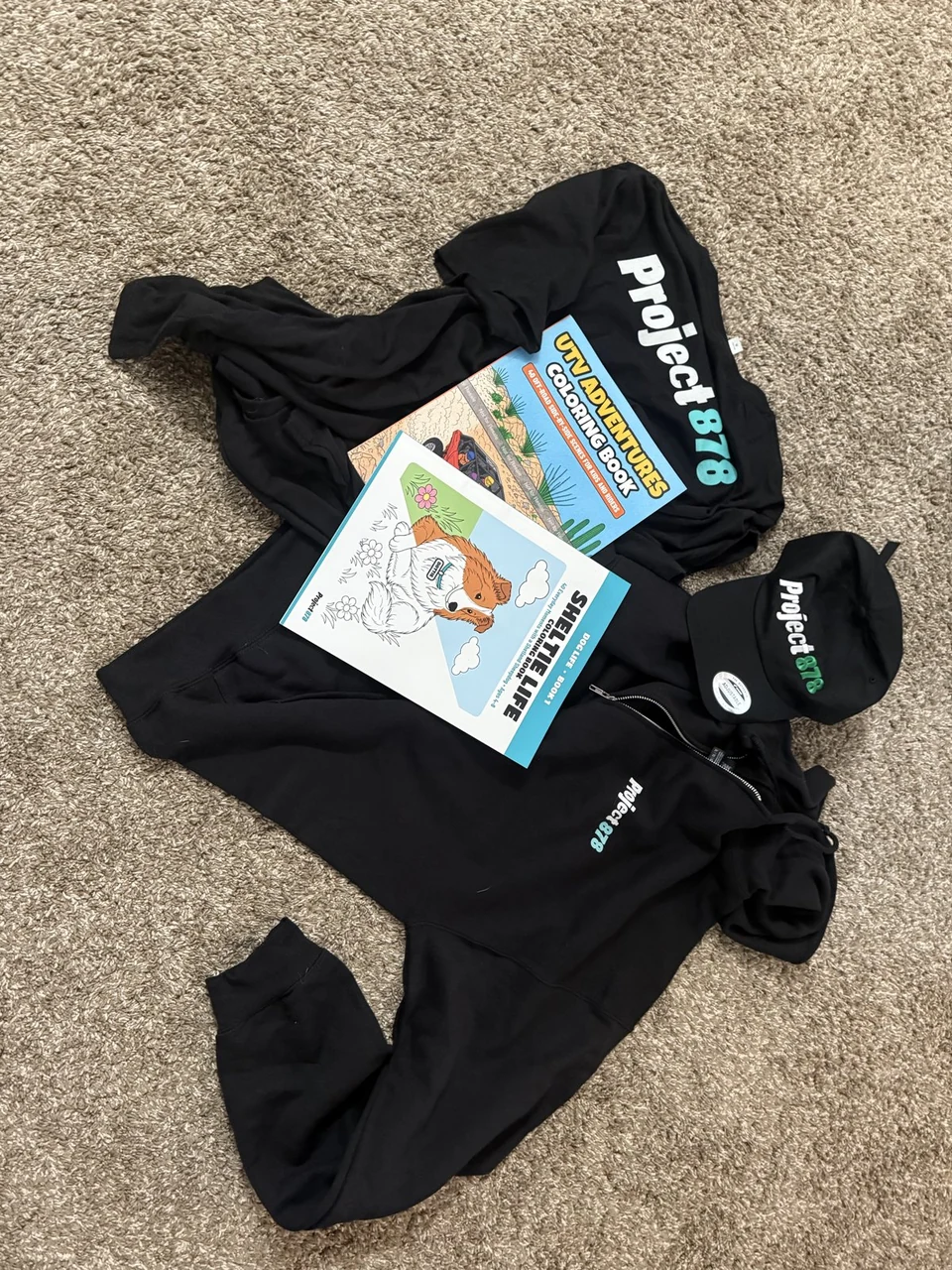
That's the weird part of building with AI. Some things move at lightning speed. Other things you still have to wait for, like a physical product being made, shipped and inspected, or buyers finding out you exist. You can't snap your fingers and make those happen. I can get a website made with a snap of my fingers, but I can't get anyone to visit it.
It's a strange feeling. Every week now feels like hurry up and wait. I can sprint to the next spot, but then I have to wait for everything around me to catch up.
Step forward 2: babysitting beats final reviews
The artist bots now post every new version side by side, so I can pop in and see what they're working on.
I popped in on a custom shirt drawing of my own dog, and it looked bad. The bot was focused on the legs and eyes, but the whole picture was off. I gave it a few tweaks, we started over, and about 15 minutes later we had a version we could ship. I almost think the render is better than my real photo.

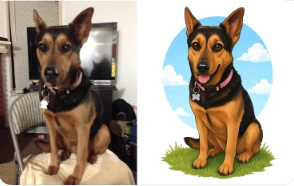
Without that check-in, the bot would've polished the wrong drawing for a long time. I can't babysit 17 bots (15 on our main team, HQ, plus two remote locations, the Studio and the Workshop), so I spot-check. When I make one fix something, it writes down how it did it and shares that with the rest of the team.
Step forward 3: software checks the bots first
I've put one of our outside AI helpers to work writing QC software. Everything will go through it before any bot or person looks at it. It catches the obvious stuff: wrong size, resolution and colors, duplicates, formatting and spelling. Our QC bots then spend their time on the things only judgment can catch.
Remote locations: the Studio and the Workshop
On Wednesday, October 28, I posted this on X: "we ran out of AI usage with 3 days left in the week. Stop work and wait, or figure out how to keep going?" Here's the answer. Our choice was to go dark for the rest of the week and only handle incoming orders, or add help that runs on its own budget. We picked the second one. The goal now is to always have at least one location working, and hopefully more, so we don't go dark again.
So we opened our two remote locations this week, the Studio and the Workshop, named for the jobs they've grown into: the Studio draws, the Workshop handles files, scripts and checks. Here's what a remote location actually is: a separate AI subscription on a different platform, with its own weekly usage budget that doesn't come out of HQ's. Each of our AI plans has a weekly limit, so we spread the work across them. When one location runs out, the others keep the work moving forward. The handoff is simple. We drop a job (instructions plus any files) into a shared Drive folder, the remote location does the work and puts the result back in a folder, and our team picks it up from there. No copy-pasting between chats.
One surprise: I expected each one to work like HQ, where I can set up several bots. It turns out each is a single helper I talk to. So a remote location is one helper, not a team, and it gets one job at a time.
Why the remote locations matter
The remote locations might be the most important thing we set up this month. They aren't just backups. Each one has its own strengths and weaknesses, and some things they do better than HQ can.
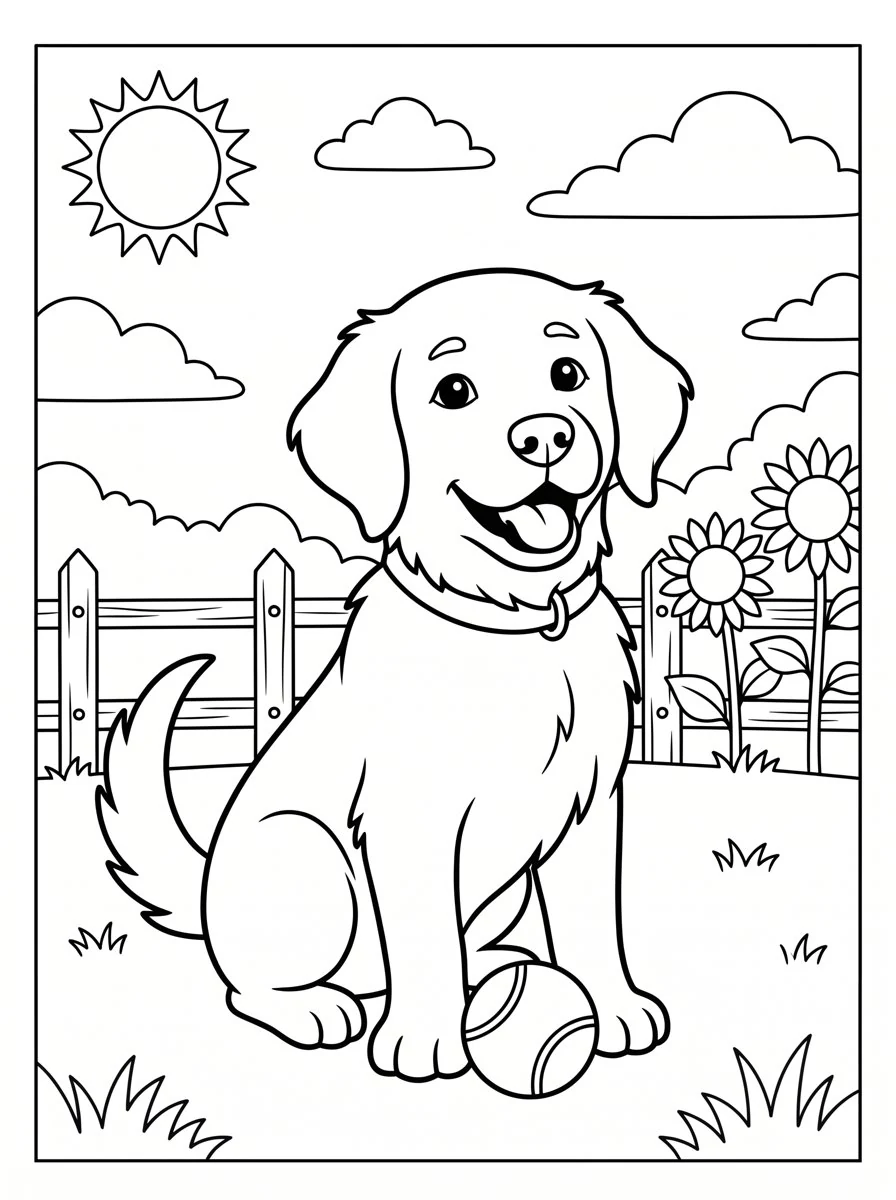
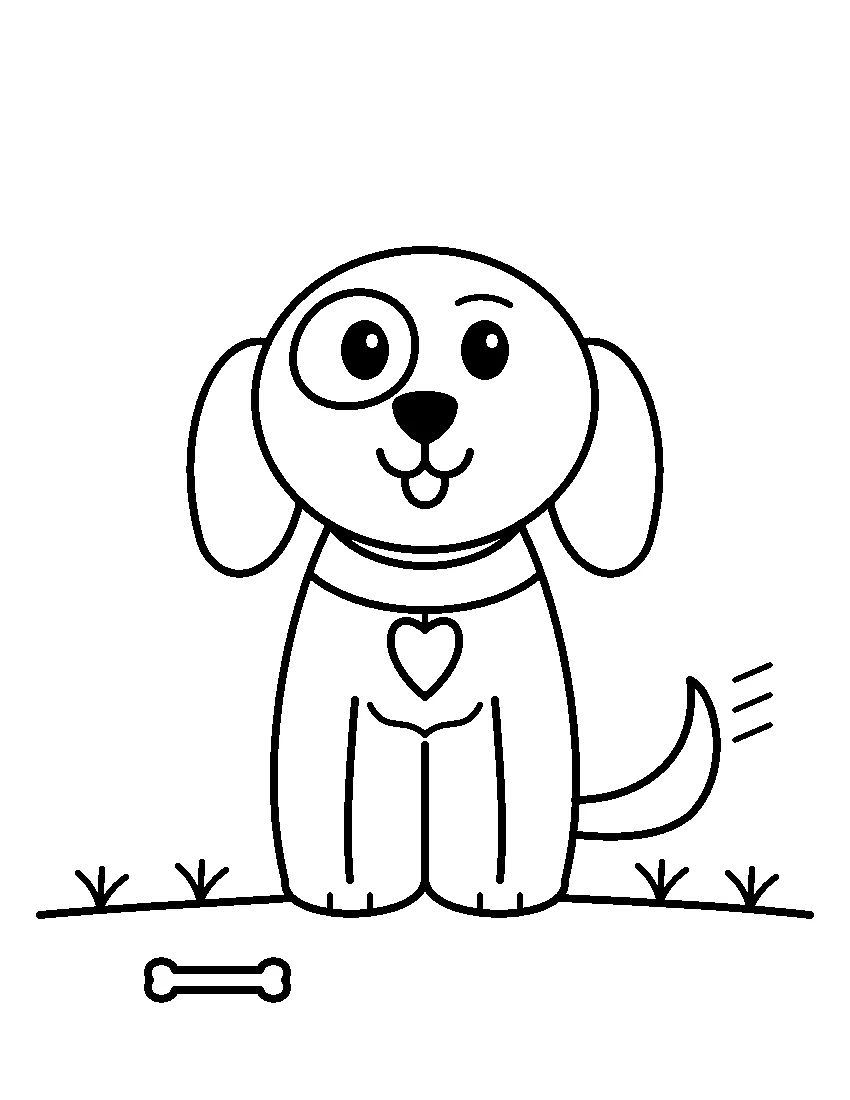
We tested both before giving them real work. One of the first tests we gave both was the same: draw a dog. Another was to run each one up to its weekly limit, to see how much work we actually get out of one plan.
- The Studio is our artist. It drew a full scene in its art test, its pictures come out detailed, and they cost HQ very little to manage. The weakness: it needs very exact instructions, or it does extra work (more on that below).
- The Workshop couldn't draw a picture to save its life. Its dog was made of circles. But in its usage test it turned out over 450 pages of future book ideas, more than our QC could get through in months, by our rough guess. Then, as a QC test, we fed it the products we already have live, and it found mistakes we had missed. It's definitely going to be an asset, just not in the art department. It's our builder: scripts, checking software, and careful file work.
One more thing we learned: the remote locations count usage differently than HQ does. HQ gets one weekly budget, so if enough bots work nonstop, we could use a whole week's worth in a single day. The remote locations have a weekly budget too, plus a shorter limit that resets during the week. At one of them, it resets every 5 hours. Ask it for 15 pictures and it might stop around 10 and tell you to come back in 5 hours. Each time that short limit fills up, it uses a chunk of the weekly budget. So the work has to be planned in small batches, handed over every 5 hours. If we don't, we can't use the whole week's budget. The other location has a daily limit instead, and each full day uses a much bigger piece of the week. A few hard sessions and we've used the whole week's worth. Still, that one is more forgiving. At the 5-hour location, each window is only a small slice of the week, so we have to fill nearly every one or leftover budget goes to waste at the reset.
And because each one runs on its own usage budget, one location running low doesn't stop the business. The work moves to whichever location still has room, and HQ saves its own budget for managing, reviews and orders. That's a big help in keeping work moving all week instead of stalling until a reset.
The nice part is that if any one location hits a limit, we can still work from the other two. The honest catch: this week, HQ and both remote locations were only up at the same time once, when I first set them up. Setting up the remote locations burned through HQ's budget fast. We got by on the two remote locations until one of them hit its limit too, and for a while we were down to one. Then a reset brought us back to two. It was musical chairs, so now a lot more planning goes into when to use each location and what to give it. When HQ ran dry mid-week, I used some leftover extra credit to keep handing jobs to the Studio and the Workshop so they didn't sit idle.
Roughly how each location's week went:
- HQ: one catch-up push burned through a big part of its week in a single day. After that, a throttle and some leftover extra credit kept it going for the rest of the week, but the Dirt Bikes book had to pause until the reset. The new week is starting heavy too, with the Christmas fix rounds.
- The Studio: more than half its week was gone by Saturday, and it's on pace to nearly run out by Monday. The upside: its pictures are very cheap for HQ to manage.
- The Workshop: its weekly window resets Sunday, and the weekend break is waiting on that reset.
The Studio drew everything twice
The Studio had a habit I didn't know about. I'd ask it to draw a picture, and it would. Then I'd ask it to save that picture to our shared folder, and it would draw the whole thing again from scratch. Every request was really two pictures.
I only found out when I hit a limit: it couldn't "redraw the picture in the folder," even though it was already on my screen. Now I say exactly this: "Without redrawing a new pic, move this existing pic to the shared folder." That works. The Studio has been the biggest pain to train so far, but I think she'll come around.
Rules we added this week
- The 2-fail stop. If QC fails a job twice, it stops and comes to me instead of looping. The mistake: a test page that went through more than 17 versions of tiny fixes.
- Babysit, don't wait for the final. I spot-check work in progress, and every fix gets written down and shared with the team. The mistake: a dog drawing that was being polished in the wrong direction.
- Software checks first. Obvious problems get caught by code before a bot or person spends time on them. The mistake: review time going to size, color and spelling slips.
The budget lesson
Catching up was expensive. We used a huge chunk of the week's AI budget in one day, so the team gets a short weekend break while we wait for the Workshop to reset on Sunday. The Studio still covers any orders that come in. Lesson learned: the most expensive work isn't the first draft, it's the redo.
Week 2 scorecard, the details
- Books: Yorkie Life (Oct 25) and UTV Adventures Vol 2 (Oct 30)
- Sales: Amazon showed one print copy sold, but that was me. I bought family copies (my sister, my cousin, myself) to check print quality. Etsy had 0 orders.
- Amazon ads: we ran 6 small ads all week. I let Amazon spend up to $1 or $2 a day on each one, but Amazon only charges when someone clicks. Our ads were shown about 1,000 times, 1 person clicked, and the whole week cost 97 cents.
- AI costs: not in these numbers yet. Between a mid-week plan upgrade, extra credits when we hit limits, and new tools, it's easier to give one honest total at the end of the month, so October's AI spend comes in the month-end wrap-up.
- Etsy: 6 visits
- Pinterest: 83 impressions, 4 pin clicks, 0 saves. The custom photo-to-coloring-page pins did best.
- X: 310 impressions, 0 new followers, mostly from the week 1 thread. Still posting into the void.
- Website: 27 visits, 58 page views, some of them us checking our own pages
- My decisions: well over 100 on a busy day, answering the bots with approvals, picks and yes-or-no calls. That's a rough count from the chat logs, not an exact number, and it's the part of this I most want to shrink.
- New lessons: check the title match at first draft, and say "move, don't redraw" when saving pictures
Week 3
Christmas push: two Christmas paperbacks are set to submit this week, and the Etsy Christmas packs get their first real promotion. We're still chasing that first real sale.
I'm keeping notes and photos as we go. If this turns into something, maybe it becomes a book someday.
Here's what we made this week: UTV Adventures Vol 2 on Amazon · Project878 on Etsy